Make some white text with a drop shadow on black in Motion and render out as Prores 4444 with Alpha. 1920x1080
Drop onto a seq on trk 2 in a timeline thats codec is ProresSQ or HQ (1920x1080) . All good.
Force render
Everything is exactly the same apart from the text which is now illegal looking at external scopes!
Seriously does anyone test this stuff !!!
Tuesday, 15 December 2009

FCP7 FreezeFrame Bug
Spent quite a few hours hunting this little one down.
Never have a freeze frame in TRK one at the beginning of the seq. Unless its your final master.
To replicate..
Make a new seq. Add a clip at say 3 seconds in. Open the clip thats in the timeline in the viewer. Goto IN.
Create a FreezeFrame, drop in at the start of the seq before the clip you added.
Duplicate the Seq.
The sequence will do something funky.. either both seq will now be named -Copy
Or the Copy will be converted to a MasterClip
Open the copy and all media vid/audio will be named the name of the seq.. not the clip name.
Also.. Undo Undo back to FF>Clip orig edit.
add another clip to TRK2 above the FreezeFrame starting at frame1.
Now select the clip in trk2 and the freeze frame at same time and nudge up a trk so they are now in trk 2 and 3
Notice this wonderful feature in action as it renames the Seq in the bin to something else thats in there like traffic.aiff. If you don't spot this and you have a lot of edits gets very confusing!
Never have a freeze frame in TRK one at the beginning of the seq. Unless its your final master.
To replicate..
Make a new seq. Add a clip at say 3 seconds in. Open the clip thats in the timeline in the viewer. Goto IN.
Create a FreezeFrame, drop in at the start of the seq before the clip you added.
Duplicate the Seq.
The sequence will do something funky.. either both seq will now be named -Copy
Or the Copy will be converted to a MasterClip
Open the copy and all media vid/audio will be named the name of the seq.. not the clip name.
Also.. Undo Undo back to FF>Clip orig edit.
add another clip to TRK2 above the FreezeFrame starting at frame1.
Now select the clip in trk2 and the freeze frame at same time and nudge up a trk so they are now in trk 2 and 3
Notice this wonderful feature in action as it renames the Seq in the bin to something else thats in there like traffic.aiff. If you don't spot this and you have a lot of edits gets very confusing!
Tuesday, 8 September 2009
FCP Confusion... again!


Ok so whats going on here then?
3 sequences in FCP
1, uncompressed 10bit
2, Prores422HQ
3, Prores4444
Add HD colour bars to each. Export the bars as QT (same format as seq) Then reimport. Whats with the 4444 one?
From the Apple white paper I gather ProRes4444 can be RGB or YUV. But FCP is YUV. So the bars must be YUV as the app generating them is YUV? If the built in bars are orig 8bit why would upsampling them cause this? see the black line between the bars.
Thursday, 3 September 2009
Normal rants to resume shortly :)
So I'm off to IBC :) yay.. no weddings to attend this year. Nearly was in China but seems to have gone away for now...
I'll update posts as I see stuff on a daily basis here with photos.
I'll update posts as I see stuff on a daily basis here with photos.
Saturday, 7 March 2009
Oh Seagate I hate.....
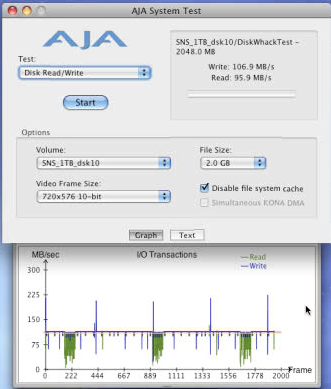
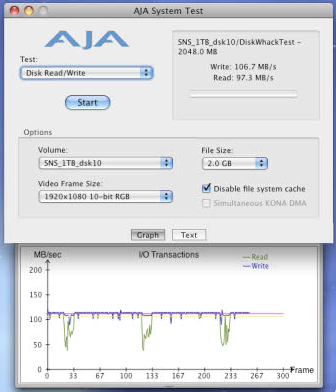
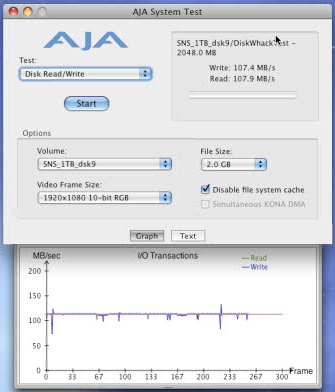
Ok so the last image is a speed test grab from a Firmware upgraded ST31000340NS 1TB Enterprise drive. FW v06
2nd.. from same spec drive, purchased at same time from same place. Had some issues in OSX with this one so Zero'd it out.
Firmware updates were from 4> v6 due to apparently "false bad block reports" Different to the AS bricked issues.
Now I know about the fake bad blocks on the NS drives and have updated the firmware.. obviously... it's actually screwed :(
Thing is.. I'd like to know whats actually causing the dips.... for future reference!
2nd.. from same spec drive, purchased at same time from same place. Had some issues in OSX with this one so Zero'd it out.
Firmware updates were from 4> v6 due to apparently "false bad block reports" Different to the AS bricked issues.
Now I know about the fake bad blocks on the NS drives and have updated the firmware.. obviously... it's actually screwed :(
Thing is.. I'd like to know whats actually causing the dips.... for future reference!


Monday, 5 January 2009
Broadcast safe limitations?


So ticking Limit RGB appears to screw the txt in this graphic somehow. 10bit 4:2:2 uncompressed on a high quality YUV render setting..Any ideas?
Saturday, 18 October 2008
Weird FCP business...
Here's another weird one.
Got sent a QT off the offline seq. Converted to prorez for fcp previz edit. Dropped onto new timeline and set all fcp setting correctly. Spliced the edit with the edl and all cuts matched.
Render out of shake preview shots (VFX)(6 in an edit of 18 shots) in prorez. all fine.
Drop onto layer 2 in fcp the vfx over the guide offline track. all fine
Export seq to prorez QT to send to client. import to fcp. all fine
Now.. open that exported QT in QT itself and about 8 frames from the end of shot 3 the gamma changes and then on shot 4 half way through the gamma bumps back up. Shot 3 is a shake render.. 4 is untouched import :-/ ???
It plays fine in fcp though :-/ A gamma change on a shot I could kinda get.. maybe.. knowing QT! but in the middle of a QT ?
So I tick the little "compatibility" button in QT and there is a subtle drop.. mainly in the reds. Untick and a massive gamma jump.
Ok so on a single clip maybe.. but in the middle of clips?
Resolved by selecting "recompress all" on export from FCP.. which obviously took longer to export!
Got sent a QT off the offline seq. Converted to prorez for fcp previz edit. Dropped onto new timeline and set all fcp setting correctly. Spliced the edit with the edl and all cuts matched.
Render out of shake preview shots (VFX)(6 in an edit of 18 shots) in prorez. all fine.
Drop onto layer 2 in fcp the vfx over the guide offline track. all fine
Export seq to prorez QT to send to client. import to fcp. all fine
Now.. open that exported QT in QT itself and about 8 frames from the end of shot 3 the gamma changes and then on shot 4 half way through the gamma bumps back up. Shot 3 is a shake render.. 4 is untouched import :-/ ???
It plays fine in fcp though :-/ A gamma change on a shot I could kinda get.. maybe.. knowing QT! but in the middle of a QT ?
So I tick the little "compatibility" button in QT and there is a subtle drop.. mainly in the reds. Untick and a massive gamma jump.
Ok so on a single clip maybe.. but in the middle of clips?
Resolved by selecting "recompress all" on export from FCP.. which obviously took longer to export!
Thursday, 9 October 2008

Wednesday, 8 October 2008


Hmm.. 2 raids.. same spec. Each running SAS to same card.
Both about 75% full.
Disks are 1TB Enterprise Seagates.


Disks are 1TB Enterprise Seagates.


Tuesday, 10 July 2007

Saturday, 23 June 2007
Random things...

Heard that the fcp6 diskspeed issue may be down to the Blackmagic 6.2 driver creating a conflict with raid cards.. so will be looking into this.
The 10.4.10 osx update appears to have fixed nearly all the opengl 3D errors in Motion3 on the macbookpro, though I still managed to get the macpro (xt1900) to have a fit, orange blocks out images etc... though I was giving it a hard time.
One thing I forgot to mention, you can preview your motion project files in Finder.
Looking forward to having a play with Mocha
http://www.imagineersystems.com/products/mocha/
Off on hols for 2 weeks now :)
Tuesday, 29 May 2007
8bits bad - 10 bits good... UPDATED


Not that easy to spot which is 10bit and which is 8bit. Till you pull a key!. Quite suprised how much quality is lost in 2bits. We were pretty sure it was a 4:2:2 problem. Live n learn.
Thanks to Nick for the info on this issue.
-Quicktime decodes 8 bit 4:2:2 media to RGB without any smoothing applied to the U and V channels, but it does apply smoothing with 10 bit 4:2:2 media-
So could this be why Prores export in QT has a 4:4:4 smoothing option ?.. intresting...
FCP6 MediaManager and "none" codec UPDATE
Yep.. so I exported the NONE codec clips to 10bit uncompressed using Batch Export in fcp. re-imported these clips. Deleted the ones that had compresion set to "none" and re media managed the project. All fine, no clips showing just black.
So none is a no-go at the moment.
So none is a no-go at the moment.
Shake(intel) error with Blackmagic Codecs

Here's what you get if you "file in" blackmagic clips to Shake on intel macs. Nice!!
Always something...

Monday, 28 May 2007
Motion3 Open GL errors

I was really looking forward to Motion3 and it's 3D (ish) enviroment. Unfortunatly I'm getting non stop errors in 3D. Currently got an ATI 1900xt in the mac pro, but I can get the MacBookPro to do it as well. Can't just be me running into this, can it! :-/
Sunday, 27 May 2007
Blackmagic codec and Shake problem..
Actually thinking about this.. it's gonna be a pain in the ass. I can't ingest uncompressed SD/HD whatever.. and just drop it into Shake. Stupid coloured pixels dancing on the left.. known issue apparently according to Luke @ Blackmagic. So Shake being no longer developed I have my doubts about this being fixed soon.
So I need to export as something Shake is cool with.
Say I capture 10bit uncompressed Blackmagic. Exporting from within FCP screws it somehow..looks ok.. but, shows up when trying to key greenscreen as heavy stepping appears. Looks the same as a big post house sent us an uncompresed 10bit quicktime. (well a few actually)Looks like a few people are getting caught out.
Quicktime export.. nope, docs say don't export anything above 8bit. Really? yuv or RGB? sigh...
So, am I gonna have to buy AfterEffects just to do this?
Can I just delete the Blackmagic codec? I mean why does it replace Apples? uncompressed is uncompressed no??
Install AJA codecs? :-/
Always something...
So I need to export as something Shake is cool with.
Say I capture 10bit uncompressed Blackmagic. Exporting from within FCP screws it somehow..looks ok.. but, shows up when trying to key greenscreen as heavy stepping appears. Looks the same as a big post house sent us an uncompresed 10bit quicktime. (well a few actually)Looks like a few people are getting caught out.
Quicktime export.. nope, docs say don't export anything above 8bit. Really? yuv or RGB? sigh...
So, am I gonna have to buy AfterEffects just to do this?
Can I just delete the Blackmagic codec? I mean why does it replace Apples? uncompressed is uncompressed no??
Install AJA codecs? :-/
Always something...
Color - Radial interpolation, very neat.

Digging this option in Color. I take it this is what the Da Vinci chaps refer to when I asked how they grade across pre-rendered cross dissolves etc..
The speed of this app is really impressive given it's included in the FCS2 package. Yes it's missing things.. no the gui isn't very Apple. The few things in the release notes are a bit of a pain, re-renders not linking etc.. but hey!
One wish is to have the Dual Screen option split in two. Either split the main screen, or keep everything on one screen as in single display and have a full screen image on the second.. take it this is a gfx card thing... 2x ati x1900 ?
Subscribe to:
Posts (Atom)